Tour operator software: the three shapes, and how to choose yours.
Tour operator software is the system a tour company runs its business on: it captures enquiries, builds day-by-day itineraries, prices trips from the operator's contracted rates, produces client-facing proposals and invoices, and keeps clients, reservations and suppliers in one place. The label hides a real split. Three structurally different kinds of product all call themselves tour operator software, and most regretted purchases come from buying the wrong kind, not the wrong brand.
This page is a buyer's guide for inbound tour operators and DMCs: companies that design and sell multi-day trips, from adventure and cultural circuits to safaris. It maps the three shapes of the category, gives you eight questions to ask in any demo, and is open about where Itero Desk sits: one product in this market, operations-first by design, with its centre of gravity in African inbound operators. The safari-specific version of this category has its own page, safari tour operator software, and that page owns the safari story end to end.
Book a demo. Bring a real trip and watch it go from enquiry to priced proposal to invoice in one sitting. Book a demo
What the software has to do, in plain terms.
Strip out the vendor language and the job list is stable across every operator that builds trips rather than reselling them:
- Catch the enquiry and work it. A pipeline that shows every open conversation and what happens next.
- Build the trip. Day by day, with destinations, accommodation, activities and transport in one structure.
- Price it from real rates. The operator's own contracted seasonal rates, the party mix, the extras, and the margin on top. Not list prices, not last year's numbers.
- Present it. A proposal the client can be sold by, and an invoice that matches it line for line.
- Confirm it. Requests to suppliers, holds with expiry dates, and a record of what is confirmed and what is still pending.
- Keep the record. Clients, documents, trip history, and who changed what.
- Survive the team. Roles, permissions and training, so the business is not one irreplaceable laptop.
Each gap on that list has a price in money, not in comfort. A quote that takes three days loses to the operator who answered the same day. A stale rate prices a trip below cost and nobody notices until the accounts do. A pipeline that lives in one inbox stops selling the week that person is away.
The three shapes of tour operator software.
The products in this category cluster into three shapes. They overlap at the edges, but each is built around a different core, and the core decides what the tool will ever be good at.
Booking-engine-first: built to sell seats online.
These tools are built around live availability and an online checkout. A traveller picks a date and a number of seats, pays on the spot, and the system manages capacity, schedules and reseller channels. This is the right shape for day tours, activities and scheduled departures sold at volume, where the product is standardised and the transaction is most of the relationship. The core asset is the checkout; itinerary building and back-office depth tend to be thin, because the business model does not need them.
Itinerary-first: built to show the trip.
These tools are built around the client-facing document: rich digital itineraries, content libraries of destinations and properties, photo-led presentation. They are the right shape when the sale is won on presentation and the pricing behind it is simple enough to manage elsewhere. The common failure mode is quiet: the document looks professional while the numbers behind it still live in a spreadsheet, with everything that implies for margin and for handover when staff change.
Operations-first: built to run the desk.
These tools are built around the operation itself: pricing, quoting, reservations, CRM, with the document as the output rather than the product. This is the right shape when every trip is priced rather than looked up: seasonal supplier rates, multiple rooms, children at child rates, vehicles and guides, fees that depend on who is travelling and when. Itero Desk is in this group, and the operations framing has its own deeper page: travel operations software.
One honest mapping before any feature talk:
| Operator profile | Where the money leaks | The right shape |
|---|---|---|
| Day tours and activities at volume, travellers pay online | Empty seats, no-shows, capacity juggled by hand | Booking-engine-first |
| Simple price list, sale won on presentation | Flat documents losing to better-looking competitors | Itinerary-first |
| Inbound operator or DMC building custom multi-day trips | Slow quotes and stale supplier rates | Operations-first |
| Safari operator pricing park fees, seasons and party mix | Hand-built spreadsheet formulas nobody dares touch | Operations-first, with safari depth |
| Agency reselling other operators' packages | Commission tracking, not trip costing | Agency software, a different category |
The plain version of the first row: a volume day-tour seller who needs travellers to check out online is better served by a booking-engine-first tool. Itero Desk deliberately does not process or hold traveller payments; it produces the quote, the proposal and the invoice, and you collect from clients however you already do. Buying an operations-first desk to do a booking engine's job wastes money in both directions.
Inside an operations-first desk: Itero Desk from enquiry to invoice.
Itero Desk is operations software for safari and tour operators: itineraries, quotes, proposals, invoices, CRM and pricing in one workspace, on web and mobile, with AI assistance built in. Here is what that means at each stage of a trip's life.
The pipeline the trip starts in.
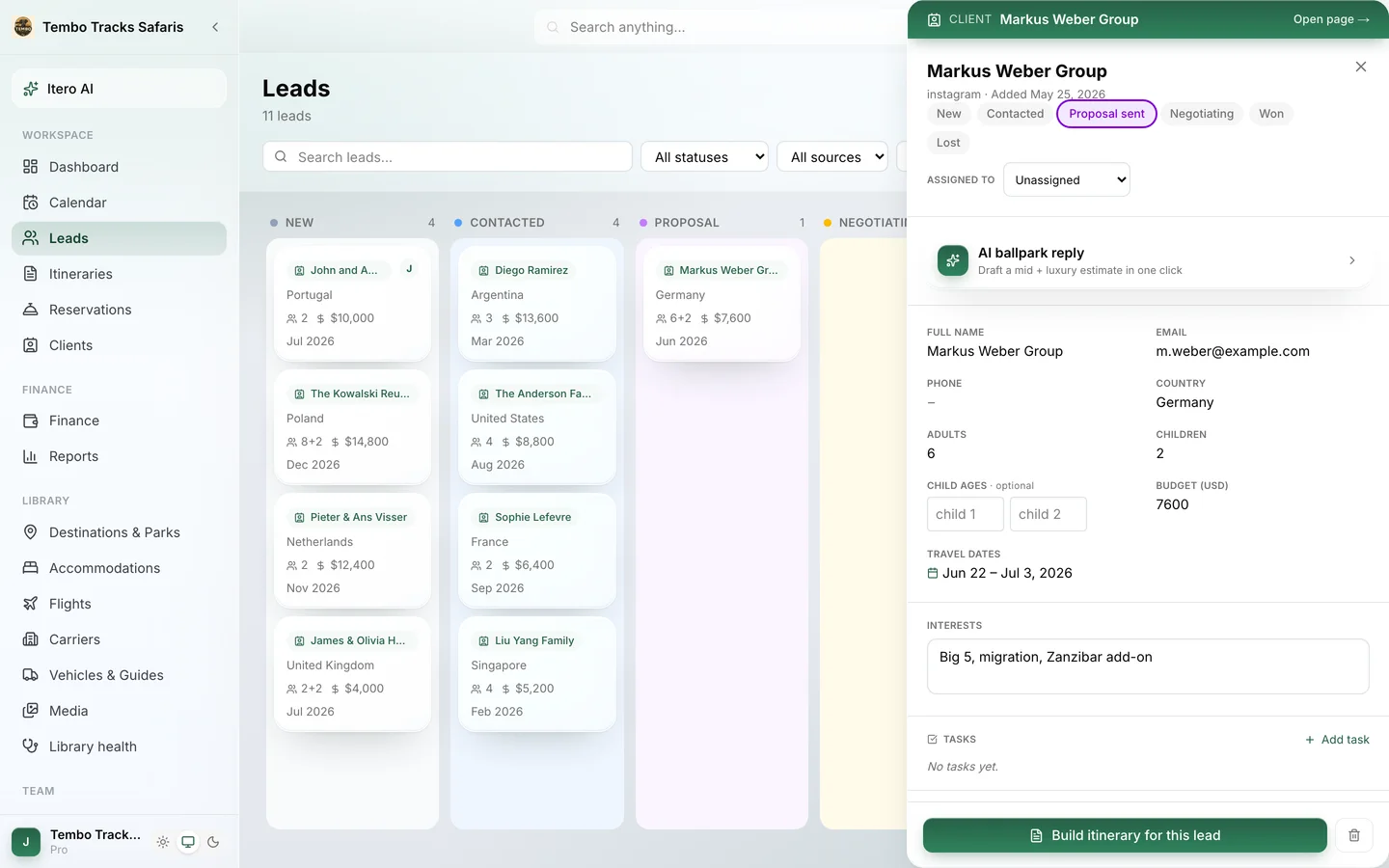
Enquiries land in a leads pipeline, as a Kanban board or a table, with six stages: new, contacted, proposal, negotiating, won, lost. Each lead opens into a drawer with the conversation, the party details, a message Composer and a Ballpark panel for a fast indicative price before anyone builds the full trip. One click converts the lead into an itinerary, and a won lead becomes a client automatically, carrying trip history, passports and documents, and dietary and medical notes. The CRM slice of the category has a dedicated page: tour operator CRM.
The itinerary builder: six steps with a live price.
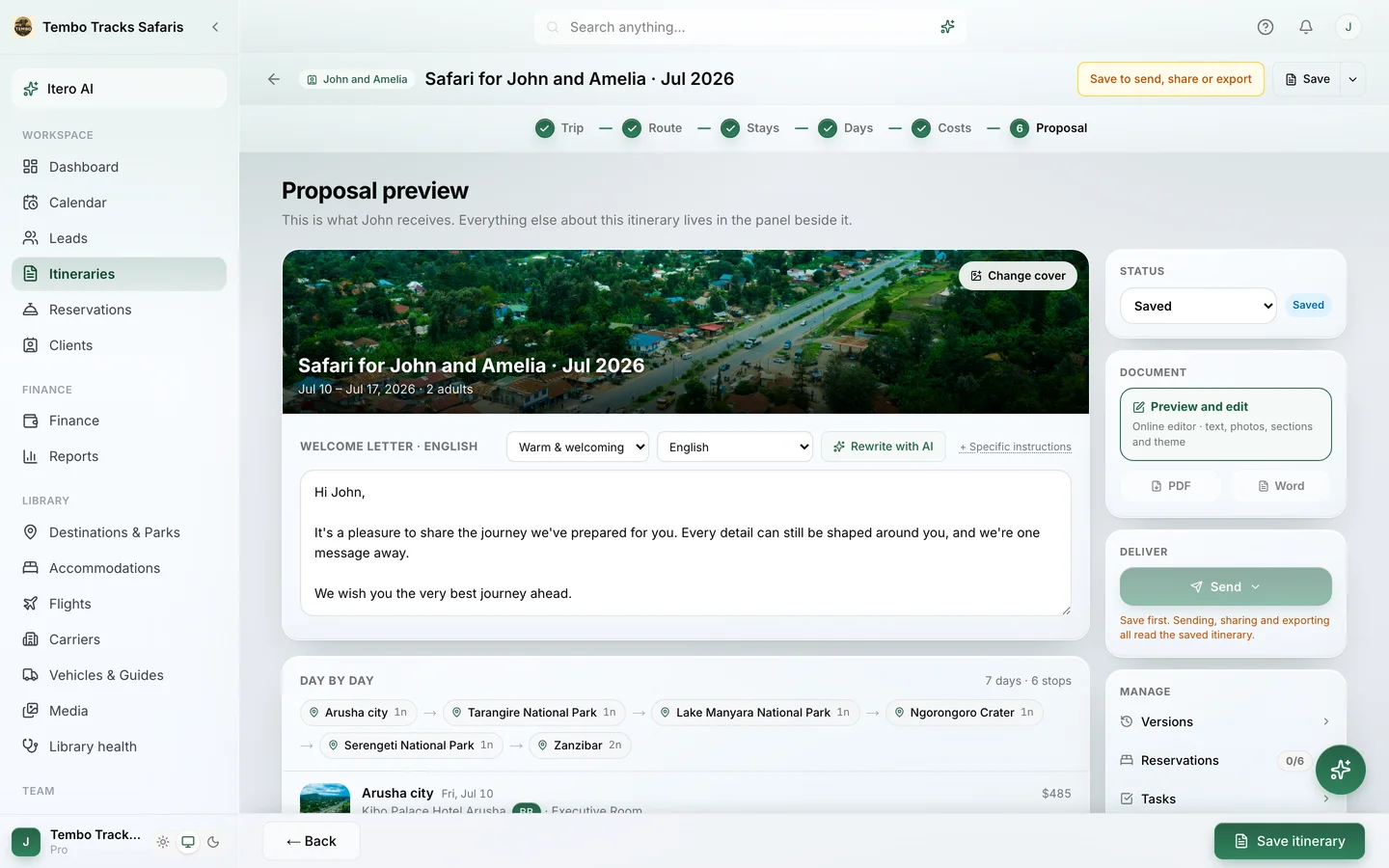
Building a trip walks through six steps: Trip (who is travelling and when), Route (destinations, order and nights), Stays (rooms and board basis), Days (activities, parks and flights per day), Costs (how the price is built) and Proposal (the client document). The cost panel updates live while the trip changes, so pricing is never a separate job done later by a different person. Trips carry versions with compare, share links and "use as starting point", so a good trip becomes a reusable asset instead of a buried file. The builder has its own page: safari itinerary builder.
Pricing from your own rates, not estimates.
Supplier rates live in the system by season and board basis, from room only through half board to all inclusive and game package. When no rate covers a travel date, the desk sees a rate-gap warning instead of a silently wrong number, and optional closest-year pricing is always labelled as an estimate. Any line can be overridden by hand: accommodation, vehicle, guide, transfers, flights, optional activities, park fees, additional costs. Margin is its own visible layer, not a number buried inside a formula. Multi-room parties, child rate bands and per-day meal plans price correctly per person.
For safari desks the engine goes further: it is tuned for safari country, fifteen countries at signup, and for the way real fee authorities charge, from TANAPA in Tanzania to KWS in Kenya, RDB in Rwanda and DWNP in Botswana, computing fees per person and per vehicle by visitor category and age band once you add the rates. That depth is covered end to end on the safari page linked above.
The documents the client actually sees.
A finished trip renders into a proposal through templates with distinct characters: Lookbook, a photography-led coffee-table book and the default; Rounded, soft and warm; Studio, a modern dark editorial. Company colours, font presets and a light or dark background are set once in settings, so every consultant's documents look like one company made them. Behind the templates sits a full proposal editor, closer to a word processor than a form: sections reorder and hide, image slots, pull quotes, a price table, a route map, terms, page breaks, version history, and a print layout that matches the PDF exactly. A proposal goes out as a downloaded PDF or as a published web proposal on a share link, and can be translated into seven languages: English, Portuguese, Spanish, French, Italian, German and Dutch.
Invoices are generated from the itinerary, so they match the quote line for line, with their own template set (Classic, Modern, Minimal, Bold) and the same pattern of share link plus matching PDF.
See your own trip in these documents. A demo builds and prices one of your real itineraries, then renders the proposal in front of you. Book a demo
After the win: reservations and resources.
Confirmed trips need suppliers confirmed. Reservations move through a lifecycle: draft, requested, option, then confirmed, with waitlisted and declined where reality demands them. A hotel request goes out as a clean document with the trip facts and no prices. Option holds carry expiry dates, with warnings three days and one day before a hold lapses, and requests that sit unanswered for three days or more get flagged before they become a problem. Vehicles and guides are costed resources with daily rates and capacity, and double-booking one across trips raises a conflict warning that names the vehicle or guide and the day.
On the web, on a phone, across a team.
The workspace runs in any modern browser and installs as an app on a phone, with an offline-tolerant shell, push notifications and a mobile layout built around the away-from-desk jobs: checking the pipeline, answering a lead, looking something up in the library. Roles keep the desk safe as it grows: owner, admin, finance, member and viewer, with an activity feed of who changed what. Every plan also includes Itero Academy, a built-in training school with eight self-paced courses, exams and shareable certificates verifiable online, so a new hire learns the system from the system.
Where AI fits, and where it does not.
Itero Desk treats AI as staff, not as the product. The assistant, Itero AI, works in the sidebar, in the builder, in the proposal editor and on leads, with specific jobs: reading a supplier's PDF, Word or Excel rate sheet into structured seasonal rates you review and confirm; importing an itinerary from a document, a pasted email or a photographed page; drafting welcome letters and proposal emails; rewriting a day's description; translating; and applying builder changes from a bounded action list, with undo. Two hard lines hold everywhere: the AI never prices from imagination, because costs come only from imported rates and the fee library, and it assists while the desk decides. Every plan includes a monthly allowance of AI actions.
How to choose: eight questions for every demo.
A demo is a performance. These questions turn it into a test, for Itero Desk or anything else on your shortlist.
- Can it price this trip from my contracted rates? Bring a real trip and a real rate sheet. If the demo can only price from sample data, ask why.
- What happens when no rate covers the travel date? The honest answers are a warning or a labelled estimate. A confident number from a stale rate is the expensive answer.
- How do my supplier rates get in? Re-typing every sheet every season is a hidden annual cost. Ask to watch an import, end to end, with a real PDF.
- Can one enquiry travel to an invoice without re-typing? Follow a single lead through quote, proposal and invoice during the demo. Count the times the same data is entered twice.
- Does the client document look like my company at its best? And does the PDF match what the screen showed? Ask to see the same proposal as a web page and as print.
- Where is the margin? It should be visible per trip, as its own layer, before the proposal goes out. If margin is a report you run later, mistakes surface after the client has paid.
- What happens when a key person leaves? Roles, permissions, an activity trail and built-in training are the difference between a team system and a personal tool with extra logins.
- What is the total price, in writing? Per seat, onboarding, add-ons, annual terms. Public pricing makes this a five-minute job; quote-based pricing makes it a negotiation.
A wider comparison of named tools, with the criteria stated openly, is on the best tour operator software page.
The real cost of switching.
The sticker price is the small number. Switching tour operator software carries three real costs, and a guide that skipped them would be selling, not guiding.
- Data migration. Clients, past trips and documents have to move, and that is real work in any direction. Itero AI shortens the rebuild by importing itineraries from PDFs, Word files, spreadsheets or pasted emails, but plan the migration deliberately rather than assuming it away.
- Rate re-entry. Historically the worst of the three: every supplier's seasonal rates, re-typed into forms. This is the cost Itero Desk removes almost entirely. The AI rate sheet import reads the documents suppliers already send and turns them into structured seasonal rates you confirm. The guide on working with lodge rate sheets shows the mechanics in the open.
- Team retraining. New system, new habits. Itero Academy carries most of this: eight self-paced courses with exams and certificates, included in every plan, so training does not depend on whoever has a free afternoon.
The 30-day trial runs the full Pro feature set with no credit card: long enough to import real rates, rebuild a few real trips and let the team earn certificates before any money moves.
Who it is for, and who it is not for.
Itero Desk fits inbound tour operators and DMCs of roughly one to fifteen people who build custom multi-day trips and currently run on spreadsheets, or on a tool that only solved the document. Its centre of gravity is African inbound operators: a workspace picks its operating country at signup from fifteen safari countries, everywhere from Tanzania and Kenya to Rwanda, Botswana and the Indian Ocean islands, which sets the hub airport default and tunes the cost engine to that country's fee mechanics; destinations, park fees and seasons are still built by the operator.
Who should buy something else: a volume day-tour seller who needs online traveller checkout belongs with a booking-engine-first tool. A desk selling outside the safari world entirely, say European city breaks or US domestic travel, would not benefit: the mechanics are built around parks, camps and safari logistics. A travel agency reselling other operators' packages needs agency software. And to keep the record straight, Itero Desk is software, not a travel agency: it does not sell, book or arrange trips, and it does not process or hold traveller payments.
It is built in Arusha, Tanzania, inside the trade it serves, and its one public customer reference is Breeze Safaris in Tanzania and Zanzibar. Real and short beats invented and long.
What it costs.
Prices are public. Starter is $74.99 per month ($59.99 per month billed annually) with one user, 50 itineraries a month and 300 AI actions. Pro is $109.99 per month ($89.99 per month billed annually) with four users, 200 itineraries a month, team roles, social media exports and priority support. Enterprise is custom, for groups that need SSO, SLAs and integrations. Annual billing saves 20%, extra seats and AI allowances are add-ons rather than forced tier jumps, and every new workspace starts with a 30-day trial of the full Pro feature set. Current numbers live on the pricing page. Much of this market quotes bespoke pricing per operator, so when comparing, get every vendor's total in writing before deciding on cost.
Frequently asked questions.
What is tour operator software?
Tour operator software is the system a tour company runs its business on. It captures enquiries, builds day-by-day itineraries, prices trips from the operator's contracted rates, produces client-facing proposals and invoices, and manages reservations, clients and suppliers. It comes in three shapes: booking-engine-first for selling seats online, itinerary-first for producing trip documents, and operations-first for running the whole desk.
What is the difference between tour operator software and a booking engine?
A booking engine sells inventory: a traveller picks a date, pays online, and the seat is sold. Tour operator software in the broader sense runs the business behind custom trips: enquiries, itineraries, pricing, proposals, invoices and reservations. Volume day-tour businesses usually need the first; inbound operators and DMCs building multi-day trips usually need the second. Some operators run both, for different products.
Does tour operator software take payments from travellers?
Some does, some deliberately does not. Booking-engine-first tools process traveller payments as their core function. Itero Desk does not process or hold traveller payments: it produces the quote, the proposal and the invoice, and you collect from clients through whatever channels you already use. If online traveller checkout is essential to your model, choose a booking-engine-first product instead.
Does Itero Desk work for tour operators outside Africa?
Its centre of gravity is African inbound operators. A workspace picks its operating country at signup from fifteen: Botswana, Ethiopia, Kenya, Madagascar, Malawi, Mauritius, Mozambique, Namibia, Rwanda, Seychelles, South Africa, Tanzania, Uganda, Zambia and Zimbabwe, which sets the hub airport default and tunes the cost engine to that country's fee mechanics; destinations, park fees, seasons and rates are still the operator's to build. A desk selling outside the safari world entirely would not benefit from mechanics built around parks, camps and safari logistics, and should weigh that honestly before booking a demo.
How hard is it to switch from spreadsheets or another tool?
Plan for three costs: moving client and trip data, re-entering supplier rates, and retraining the team. Itero Desk reduces the second with AI rate sheet import, which reads PDF, Word and Excel sheets into structured seasonal rates you review, and the third with the built-in Academy's self-paced courses and certificates. The 30-day trial of the full Pro plan lets you test all of it on real data first.
What does tour operator software cost?
Itero Desk publishes its prices: Starter at $74.99 per month and Pro at $109.99 per month, both about 20% cheaper billed annually, with a custom Enterprise tier above. Every plan includes the itinerary builder, cost engine, proposals, invoices, CRM and Academy training. Much of the market quotes bespoke pricing per operator, so ask each vendor for the total in writing, including onboarding fees.
Do I still need a separate CRM?
Usually not. Generic CRMs track deals but have no concept of a season band, a child rate or an option hold, so operators end up running a CRM plus a pricing spreadsheet plus a document tool. Operations-first software includes the pipeline: in Itero Desk a lead converts to an itinerary in one click, and a won lead becomes a client record automatically, with trip history and documents attached.
The next enquiry deserves a same-day quote. Book a demo and follow one of your real trips from enquiry to invoice in Itero Desk. Book a demo · Existing customer? Sign in