A safari itinerary builder that prices the trip while you build it.
A safari itinerary builder is software that turns an enquiry into a complete, priced, client-ready trip: a route with nights per stop, rooms and board basis for every stay, a day-by-day plan with parks, activities and flights, costs computed from contracted rates and park fees, and a finished proposal. In Itero Desk the builder is a six-step workflow, Trip, Route, Stays, Days, Costs and Proposal, with a live cost panel that reprices the trip every time a night, a room or a flight changes.
This page walks through those six steps with one continuous example: a seven-day northern Tanzania safari for two adults and two children, two rooms, one vehicle, and a light-aircraft flight at the end. For the full category picture, the safari tour operator software page covers the whole desk. This one stays inside the builder, because building the trip is where quotes are won and margins are lost.
Book a demo. Build one of your own trips in Itero Desk, on a call with a person who knows the trade. Book a demo
Why safari itineraries are hard to build.
A safari is assembled per enquiry, not picked from a shelf, and every part of the assembly can go wrong in a way that costs real money.
- The route is arithmetic that keeps changing. Nights per stop drive everything. Add a night in the Serengeti and every date after it moves, and a stay that was priced in one season band may now sit in another. On a spreadsheet that recalculation is manual, so under deadline it gets skipped.
- A park day and a travel day are not the same cost. A full day inside a park, a game drive on the way through, and a transfer past the gate carry different fees. Some parks are visited for the day from a lodge outside them, which is charged differently again.
- Flights between camps change everything downstream. Replace the drive out of the Serengeti with a light-aircraft leg and the day plan changes, the vehicle plan changes and a new cost line appears. The quote has to keep up with all three at once.
- The party is priced person by person, room by room. Two adults and two children in two rooms is a normal booking, and it means child age bands at every park gate, child policies at each property, and a board basis that differs between the town hotel and the camps.
- The price moves while you plan. Every decision above changes the cost. When pricing is a separate spreadsheet run after the itinerary is "finished", the errors surface after the proposal has gone out, and they are usually paid for out of the margin.
A builder for safaris has to treat all of this as the normal case, not the exception. Itero Desk's builder is shaped that way: six steps, with the price recomputed live at every one of them.
Six steps from enquiry to proposal.
The builder walks one trip through six steps. Here is the map, using the example this page follows throughout.
| Step | The question it answers | In the worked example |
|---|---|---|
| Trip | Who is travelling, and when | Two adults, two children with ages recorded, seven days |
| Route | Where, in what order, for how many nights | Arusha, Tarangire, the Ngorongoro highlands, the Serengeti |
| Stays | Which rooms, on what board basis | Two rooms at every stop; B&B in town, full board on safari |
| Days | What happens on each day | Game drives, a crater day visit, one flight back |
| Costs | What it costs, and what the desk earns | Park fees, lodge rates by season, the margin layer |
| Proposal | What the client sees | A branded document on a share link, with a matching PDF |
Trip. Who is travelling, and when.
Everything starts with the party, because on a safari the party is a pricing input, not a headcount. The example trip is two adults and two children, and the children's ages are recorded at this step: age will decide the park fee band at every gate and the child rate at every property later on. The dates go in here too, which will place each stay inside the right season band when the rates are applied. If the enquiry arrived through the leads pipeline, one click converts the lead into an itinerary and the party details travel with it, so nobody re-types what the client already said.
Route. Destinations, order and nights.
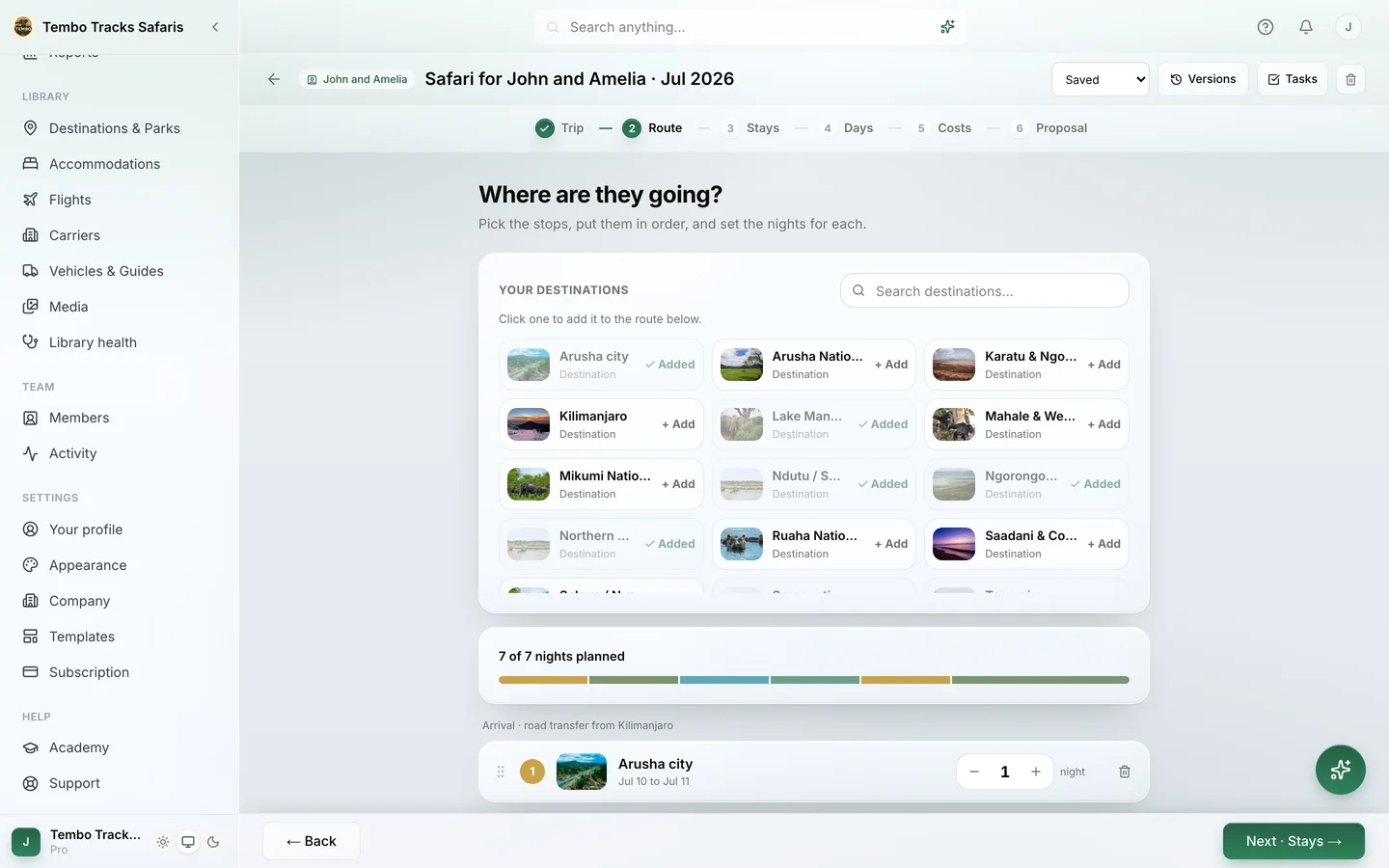
The Route step is the skeleton: destinations in order, with nights per stop. The example allocates one night near Arusha to land and rest, two nights at Tarangire, one night in the Ngorongoro highlands and two nights in the Serengeti. Seven days, six nights, four stops. Change the order or the night counts and the calendar follows; drop a stop and everything after it moves up. This is exactly where a spreadsheet quietly breaks, because every change re-dates every stay after it. The builder keeps the dates, the stops and the stays consistent, so the desk can think about the trip instead of the arithmetic. For the routing decisions themselves, how many camps, what pace, which order, the guide on building multi-camp safari itineraries goes deeper.
Stays. Rooms and board basis, per stop.
Stays puts people in rooms at each stop. The example needs two rooms everywhere: the adults in one, the children in the other. Board basis is set per stay, and it rarely matches across a trip: bed and breakfast at the town hotel in Arusha, full board at the camps. The engine understands the full run of board bases, from room only through bed and breakfast, half board, full board, all inclusive and game package, and meal plans can vary per day where a property requires it. This matters at the Costs step, because seasonal rates are stored by board basis: pick the wrong basis and the price is wrong even when the rate sheet is right. Multi-room parties are the standard case here, not an edge case. The builder prices each room against the property's own rates and child policy, rather than multiplying a per-person figure and hoping.
Days. Parks, activities and flights, day by day.
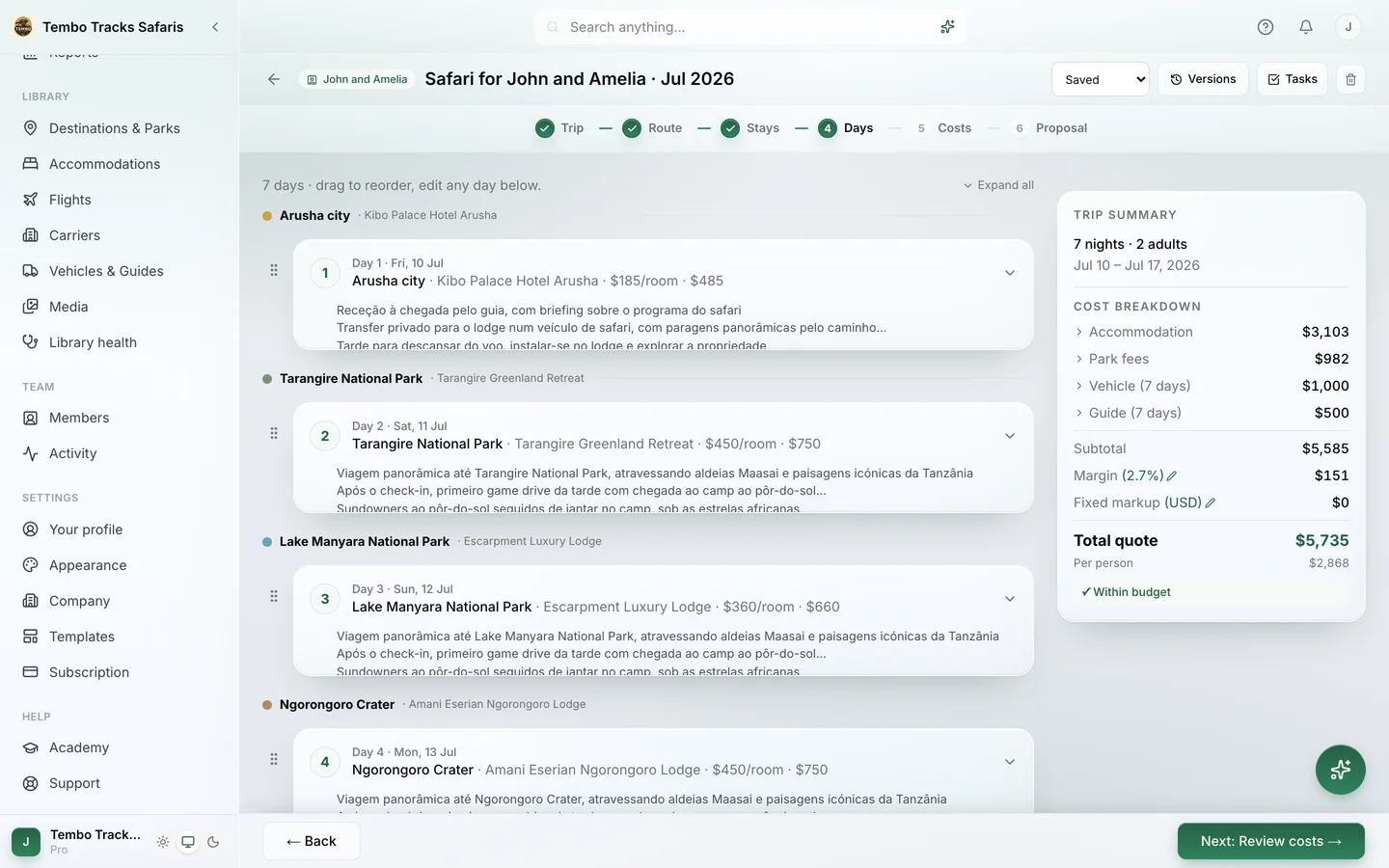
The Days step turns the route into a plan: which park, which activities, which flights, on each day. The example fills in game drives at Tarangire, and then day four does something safaris do all the time: the family descends into the crater in the morning and drives on into the Serengeti in the afternoon. One day, two destinations. The builder supports multi-destination days, so that day is planned and priced as it will actually happen, not forced into a single location because the software cannot express it. It also knows the difference between a park you sleep inside and a park you visit for the day: the crater morning is a day visit, and the day-visit park fee logic charges it as one, rather than as another night in the park.
On day seven the vehicle hands over to the air: transfer to the airstrip, light-aircraft flight back to Arusha, departure. The flight sits on the day it happens, drawn from the flights and carriers in the Library, and becomes a cost line like everything else. What is written in the Days step feeds the proposal day by day, so the trip's story is told once and reused everywhere.
Costs. The price, assembled in the open.
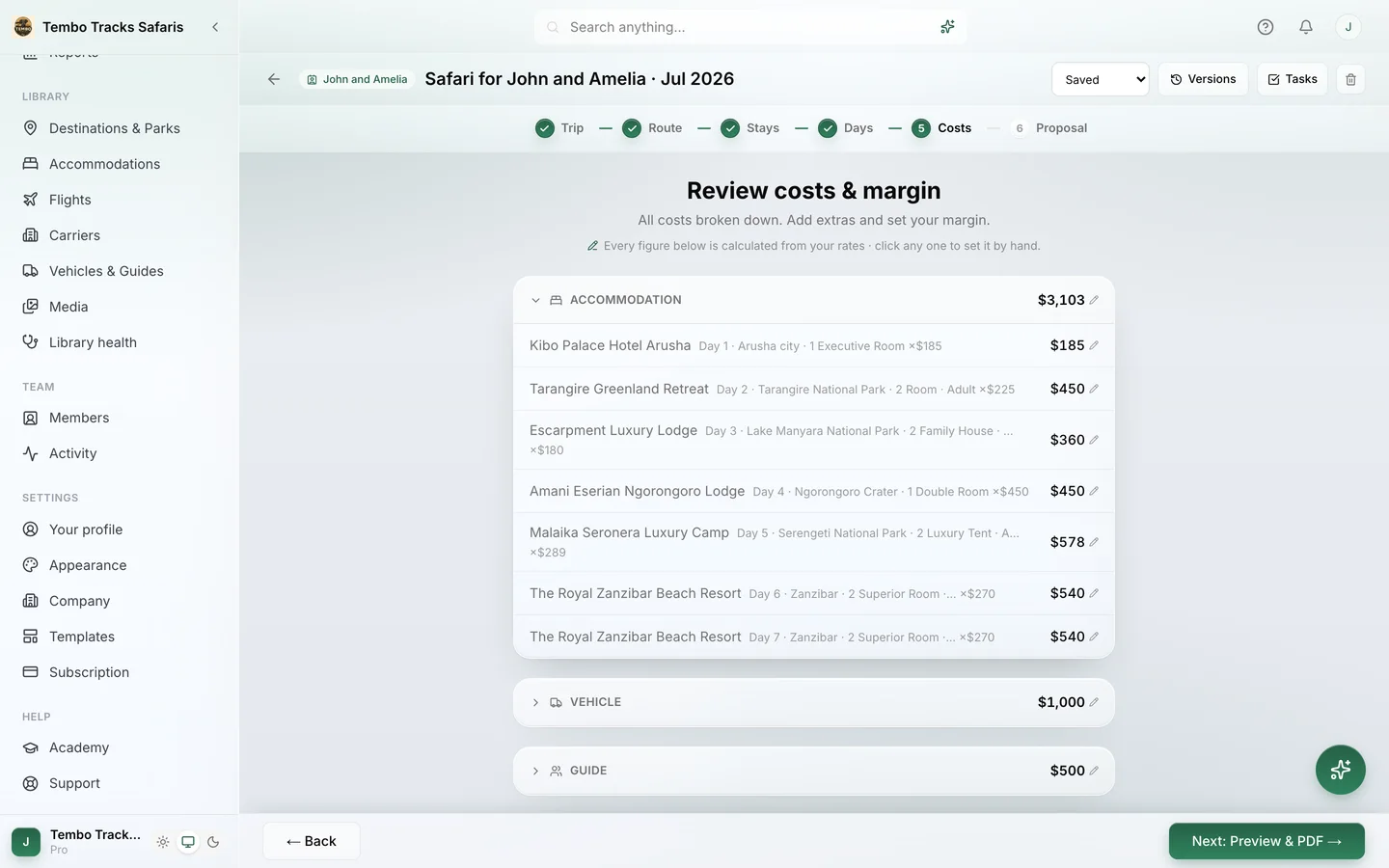
By the time the trip reaches the Costs step, most of the price already exists, because the live cost panel has been repricing the trip at every earlier step. Costs is where the desk sees how the number is built, and adjusts it.
Park fees are computed per person and per vehicle, by visitor category and age band, with the breakdown visible per park: the Tarangire days under TANAPA, the crater visit under the NCAA, the Serengeti nights under SENAPA. The two children are priced in their own fee bands because their ages were recorded back at the Trip step. Lodge rates come in by season and board basis from the operator's own imported rate sheets. When no rate covers the travel dates, the builder raises a rate-gap warning instead of pricing from a stale sheet; it can price from the closest year on request, and that number is always labelled estimated. Any line can be overridden by hand: accommodation, vehicle, guide, transfers, flights, optional activities, park fees or additional costs. Margin sits on top as its own visible layer, so the selling price and the desk's earning are never confused with each other.
The thinking behind the engine is public. The guide on how to price a safari itinerary explains the mechanics in the open, and the tour pricing software and tour cost calculator pages cover the engine in its own right.
Proposal. The document the client sees.
The last step renders the trip into the document the client will judge: cover, day-by-day story, price, practical details. Templates carry the character: Lookbook is a photography-led coffee-table book, Rounded is soft and warm, Studio is a modern dark editorial. Company colours and fonts are set once in settings, so every consultant's proposal looks like the same company made it. The proposal goes out as a published web page on a share link or as a matching PDF, and can be translated into seven languages: English, Portuguese, Spanish, French, Italian, German and Dutch. Design is its own subject: the safari itinerary templates page shows the three templates properly, and the travel proposal generator page covers the document workflow from the writing side.
See the six steps on one of your own trips. A demo builds a real itinerary with your rates, not sample data. Book a demo
Quoting is a loop, not a line.
No safari is sold on the first draft. The client comes back: can we drop Tarangire and add a third night in the Serengeti, can the children share with the parents, is there a camp at a lower rate. The builder treats that loop as the normal workflow rather than an interruption.
- Versions with compare. Each round of changes can be kept as a version, and versions can be compared, so "what changed between the quote they liked and the quote they queried" is an answer, not an archaeology project.
- Use as starting point. Any itinerary can seed a new one, so the third variation does not begin from a blank trip.
- Saved safaris. The routes a desk sells often can be kept as saved safaris and pulled out when the next matching enquiry lands, then adjusted to the party and the dates.
- Share links for review. A trip can be shared on a link for internal review before the client sees anything, which is how an owner checks a new consultant's pricing without standing behind their chair.
- The live cost panel, all the way through. Across every round, the price stays visible while the trip changes, and a rate-gap warning appears the moment a change pushes a stay outside the rates the desk holds. Repricing is not a separate job that can be forgotten in round three.
The quote the client finally accepts is the same object the desk has been editing all along, not a re-typed summary of it.
The desk around the builder.
The builder is one part of an operations platform, and it is connected on both sides. Upstream, enquiries live in a leads pipeline with a Ballpark panel for a fast indicative figure before anyone commits to a full build; converting a lead starts the trip with the party details already in place. Downstream, the itinerary that wins is never re-typed anywhere. The invoice is generated from it, with its own template set and a share link plus matching PDF. Confirmed trips appear in a client portal, a branded web page per trip that needs no login from the traveller. Reservations track what the trip depends on, from requested through option hold to confirmed, with reminders before a hold expires or a request goes stale.
The resources in the trip are real records, not labels. Vehicles and guides live in the Library with daily rates and capacity, and if the example's vehicle is already committed to another trip on the same days, the desk sees a conflict warning naming the vehicle and the day. The whole workspace runs in the browser and installs as an app on a phone, so the pipeline, the library and the trips are readable from the field. The builder ships in every plan, alongside the cost engine, proposals and invoicing; plan details live on the pricing page.
Where Itero AI fits.
Itero AI is the assistant inside the desk, and in the builder it has a few specific jobs. It can import an itinerary from a PDF, a Word file, a spreadsheet, a pasted email or a photographed document, and draft the trip in the builder, which matters when a trip arrives as another operator's document rather than as a form. It can apply changes on request from a bounded list of builder actions, with undo. And it can write: rewrite a day's description, suggest activities, draft the welcome letter or the proposal email, translate. What it never does is price from imagination. Costs come only from the imported rates and the park fee library, and every plan includes a monthly allowance of AI actions. The assistant assists; the desk decides.
Who this builder is not for.
The builder is specific about its ground. A desk selling outside the safari world entirely, say European city breaks or US domestic travel, would not benefit from the tuned fee mechanics: they are built around parks, camps and safari logistics, and park fees are a large part of what makes this builder worth switching for. An operator who prices by hand and only wants a better-looking document may be well served by an itinerary-first tool, or can start from the safari itinerary templates page and judge the documents on their own. And Itero Desk is software, not a travel agency: it does not sell, book or arrange trips, and it does not process or hold traveller payments. You collect from clients however you already do.
Frequently asked questions.
What is a safari itinerary builder?
A safari itinerary builder is software that assembles a safari per enquiry: destinations and nights, rooms and board basis, day-by-day plans with parks and flights, and a price computed from contracted rates and park fees. In Itero Desk it is a six-step workflow, Trip through Proposal, with a live cost panel that reprices the trip as it changes.
How does the builder handle children in the party?
Children are recorded with their ages at the Trip step. Age then drives two separate calculations: the park fee band at each park and authority, and the child rate at each property. Multi-room parties are standard, so two adults and two children in two rooms price correctly without a side spreadsheet for the family maths.
What happens when no rate covers my travel dates?
The builder shows a rate-gap warning instead of a silently wrong number. You can price the line from the closest year, and that price is always labelled estimated, or you can override the line by hand. Overrides exist for accommodation, vehicles, guides, transfers, flights, optional activities, park fees and additional costs.
Can one day cover more than one destination?
Yes. A day can span more than one destination, which safaris need constantly: a morning in the crater and an afternoon drive into the Serengeti is one day in two places. Day-visit park fee logic exists too, so a park you visit for the day is charged differently from a park you sleep inside.
Can I reuse an itinerary for the next enquiry?
Yes, in two ways. Any itinerary can be used as a starting point for a new one, and the trips a desk sells repeatedly can be kept as saved safaris. Either way, the new trip is priced from your rates for its own dates and its own party, rather than dragging old numbers forward.
Does the builder handle flights between camps?
Yes. Flights belong to the Days step: a light-aircraft leg is placed on the day it happens and appears as its own cost line. Flights and carriers live in the Library, flight rates can be imported, and the flight shows up in the client proposal as part of the day it belongs to.
Does Itero Desk book the lodges and flights for me?
No. Itero Desk is software for your own desk, not a travel agency: it does not sell, book or arrange trips, and it does not process traveller payments. It produces the requests, documents and invoices; reservations track each request through requested, option hold and confirmed, with reminders before a hold expires.
The next enquiry deserves a same-day itinerary. Book a demo and build one of your real trips in Itero Desk, end to end. Book a demo · Existing customer? Sign in