Travel operations software that catches what the inbox drops.
Travel operations software runs a tour operator's own back office: reservations and option holds, vehicles and guides, the shared library of destinations, accommodations and rates, invoices, finance and the team's roles. It is not a booking engine and not a channel manager. It does not publish inventory to travellers and it does not take traveller payments. It manages the work the desk itself does between winning a trip and delivering it, which is where operators who sell well quietly lose the most money.
Itero Desk is operations software for safari and tour operators: itineraries, quotes, proposals, invoices, CRM and pricing in one workspace, on web and mobile, with AI assistance built in. The hub page on safari tour operator software covers the whole category end to end. This page stays on the operations layer, because for one kind of operator that layer is the whole problem.
Book a demo. Bring one real confirmed trip and watch it run through Itero Desk, holds, vehicles and invoice included. Book a demo
The desk that sells well and still leaks money.
This page is written for a specific operator. The enquiries arrive. The proposals win. Agents come back season after season. Selling is not the problem, and if it were, the selling side of the desk has its own page on tour operator CRM.
The problem starts after the yes. Confirmations live in inboxes, filed under whoever happened to answer. An option hold sits in a thread nobody reopens until the lodge releases the room. One vehicle gets promised to two trips because the schedule lives in two heads. Rates sit across spreadsheets, PDF folders and last year's emails, and the one person who knows where everything is cannot take a holiday.
None of this looks like failure on the day it happens. It gets priced later, in bought-back rooms, last-minute hires and quiet apologies to agents. Here are the five commonest failure modes on a busy desk, what each one costs, and what Itero Desk does about it.
| The failure | What it costs | What Itero Desk does |
|---|---|---|
| An option hold lapses silently | The room is released while the trip is already sold; the desk re-buys space at whatever rate it can find, or goes back to the agent to change the trip | Every option carries its expiry date, with automatic warnings 3 days and 1 day before it lapses |
| A hotel request sits unanswered | The itinerary stalls; the client's dates drift out of reach while the desk assumes someone is on it | A request unanswered for 3 or more days raises a stale-request reminder |
| A vehicle or guide is double-booked | A last-minute hire at market price, a downgraded guide, or a cancelled departure | A per-day conflict warning that names the vehicle or guide claimed by two trips |
| Prices leak to suppliers | A lodge sees the selling price and can read the margin behind it | Hotel requests go out as a clean document with the trip facts and no prices |
| The operation lives in one laptop | When that person is away, nothing moves; when they leave, the desk starts over | A shared library, team roles, and an activity feed of who changed what |
The rest of this page walks through the layer that closes those holes: reservations and resources, the library, the documents, the money and the team.
Not a booking engine, and not a channel manager.
The word "operations" gets attached to very different software, so the boundary is worth drawing before comparing anything.
A booking engine sells inventory to travellers on a website and takes their payment at checkout. A channel manager pushes rates and availability out to resellers. Both are distribution software: they face the market, and they earn their keep by moving inventory. Travel operations software faces the other way. It assumes the selling is happening, through agents, through email, through the operator's own pipeline, and runs the machinery behind it: which requests are out, which holds are expiring, which vehicle is where, which rate applies, which invoice went out.
Itero Desk sits deliberately and entirely in the second category. It is software, not a travel agency: it does not sell, book or arrange trips, it does not publish your inventory anywhere, and it does not process or hold traveller payments. You collect from clients exactly as you do now. That is not a missing feature. A system that holds your private costings and margins should not also be a shopfront.
If you are still mapping the category before choosing anything, the buyer's guide on tour operator software covers it end to end. This page assumes the selling works and the operations do not.
Reservations and resources: the operational core.
Every request and hold in one list.
In Itero Desk, each booking behind a trip is a reservation with an explicit stage: draft, requested, option, then confirmed, waitlisted or declined, with cancelled and superseded for the edge cases. The stage lives on the record, not in a mailbox, so anyone on the desk can answer "where are we with the lodge?" without forwarding a thread.
Two automatic reminders do the remembering. A request that has sat unanswered for 3 or more days raises a stale-request reminder. An option hold carries its expiry date and warns the desk 3 days and 1 day before it lapses. Chasing suppliers is still human work; forgetting to chase them stops being a risk.
The full lifecycle, from first request through confirmations, waitlists and supersessions, has its own deep page on tour booking management software. Here the point is the operational effect: nothing expires in silence.
Requests that keep your prices private.
When the desk asks a property for space, Itero Desk generates the hotel request as a clean document carrying the trip facts a property needs, with no prices on it. The lodge sees dates, party and rooms. It does not see your selling price, and it cannot reverse-engineer your margin from your own paperwork.
Vehicles and guides that cannot be in two places.
Vehicles and guides are resources in the library, each with daily rates and capacity, and trips book them per day. The moment two trips claim the same vehicle or the same guide on the same day, Itero Desk raises a conflict warning naming the resource. The warning arrives at planning time, when the fix is a calm swap, not on the morning of departure, when the fix is an expensive phone call.
A calendar the whole team sees.
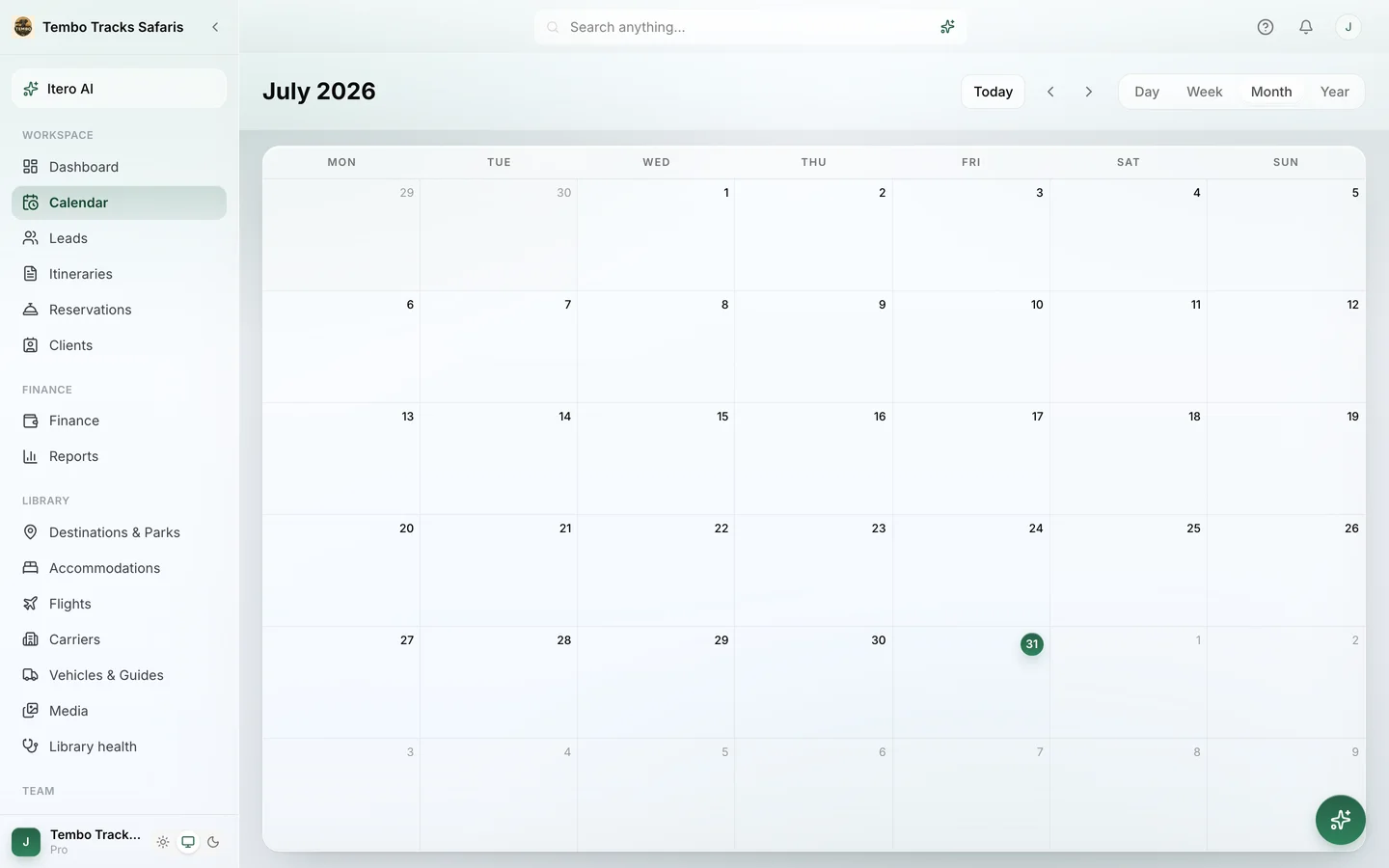
Alongside the reservation list sits the Calendar, the shared view of what is running when. It replaces the whiteboard, and the photo of the whiteboard on someone's phone.
The desk in the field.
Itero Desk runs in the browser on any laptop and installs as an app on a phone, with push notifications and a mobile layout built around four bottom tabs: Home, Leads, Itero AI and Library. Operations do not pause because the owner is at the airstrip; the pipeline, the library and the assistant travel along.
The Library: the desk's operational memory.
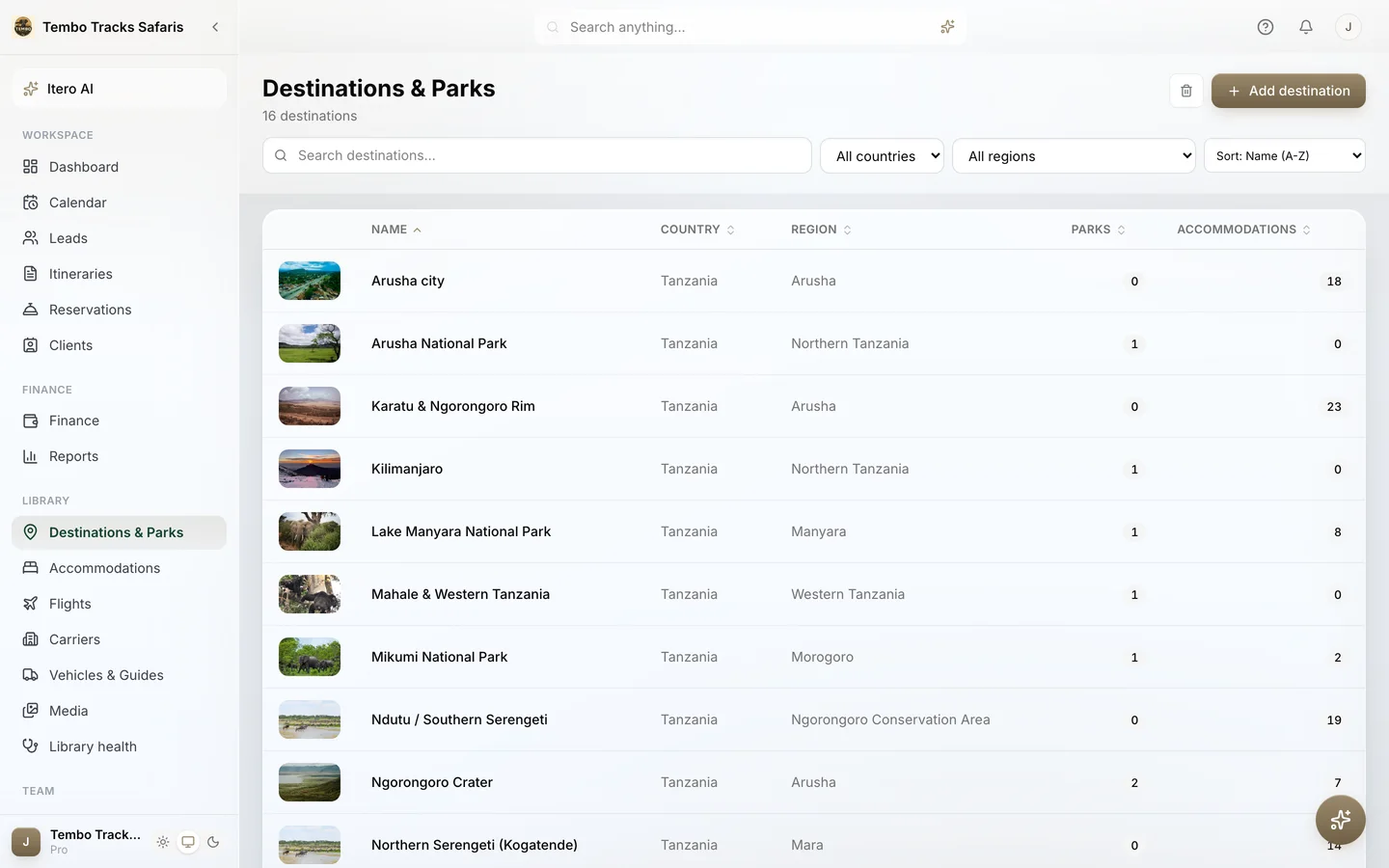
Every operator already owns a library. It is just scattered: rates in a folder of PDFs, park fees in a spreadsheet, vehicle plates in a notebook, photos on three phones. The Library in Itero Desk is that same knowledge in one shared place, with seven sections.
- Destinations & Parks. The places trips visit, priced through the operating country's real fee structures and authorities as you add them, so park costs are data, not folklore.
- Accommodations. Properties and their seasonal rates by board basis, from room only through full board to game package, imported from the rate sheets suppliers actually send.
- Flights and Carriers. The routes and airlines behind fly-in itineraries, with flight rates imported like everything else and the country's hub airport already in place.
- Vehicles & Guides. The desk's own fleet and people, with daily rates and capacity, feeding both trip costing and the conflict warnings above.
- Media. The photo library behind proposals and templates, stored once and reused across documents.
- Library health. The section dedicated to the state of the library itself.
This is the direct answer to the one-laptop problem. When rates, fees, fleet and photography live in a shared library with roles in front of it, anyone with permission can build a quote, check a hold or answer an agent. The desk stops depending on one person's memory, and a holiday stops being an operational event.
See your own library assembled. A demo starts from your real rate sheets and trips, not sample data. Book a demo
Documents and money: what leaves the desk.
Operations end in documents, and the documents are only trustworthy if they come from the same system as the operation.
Trips are built in a six-step itinerary builder, from Trip and Route through Stays and Days to Costs and Proposal, with a live cost panel updating as the trip changes, so the price is built with the trip rather than reconciled afterwards. When no imported rate covers a travel date, the desk sees a rate-gap warning instead of a silently wrong number. The pricing layer, seasonal rates, park fees and margin as its own visible line, has a dedicated page on tour pricing software.
The client sees a proposal in one of three templates, Lookbook, Rounded or Studio, published on a web share link or downloaded as a PDF that matches it exactly. When the trip confirms, the invoice is generated from the itinerary itself, with a preview-and-edit surface before it goes out, its own template set (Classic, Modern, Minimal and Bold) and a share link plus matching PDF. The numbers on the invoice are the numbers in the costing, because they never left the system. Finance and Reports round out the back office, in the same workspace as the trips they describe.
The team layer: roles, activity and training.
An operations layer is only as strong as the rules about who can touch it. Itero Desk ships five roles, owner, admin, finance, member and viewer, so pricing, settings and money stay with the right people while the whole desk works in one place. An activity feed records who changed what, which ends the archaeology of working out who edited a quote and when.
Onboarding is built in rather than bought in. Every plan includes Itero Academy: eight self-paced courses with certification tracks for members and admins, 25-question exams with a pass mark of 80%, and shareable certificates verifiable online. A new consultant learns the desk from the software, not from whoever can spare an afternoon.
Where Itero AI fits.
On this page, deliberately last. Itero AI is the assistant inside the workspace, and its operations jobs are specific: it imports rate sheets from PDF, Word or Excel into structured seasonal rates you review and confirm, it imports park fees and flight rates, and it reads an itinerary out of a document, a pasted email or a photographed page. In the builder it applies changes from a bounded action list, with undo. Every plan includes a monthly allowance of AI actions, and the assistant never prices from imagination: costs come from your imported rates and the park fee library. The operations layer stays deterministic; the AI shortens the typing.
Who it is for, and who it is not for.
Itero Desk is built for safari and tour operators, and DMCs, operating in fifteen safari countries, from Tanzania and Kenya to Rwanda, Botswana and the Indian Ocean islands. The sweet spot for this page is a desk of one to fifteen people whose selling already works and whose operations run on inboxes, spreadsheets and memory. It is built in Arusha, Tanzania, inside the trade it serves, and is used by real operators, including Breeze Safaris in Tanzania and Zanzibar.
Who should look elsewhere. An operator whose real problem is distribution, online checkout or connectivity to resellers needs a booking engine or channel manager, which Itero Desk deliberately is not. A desk selling outside the safari world entirely, say European city breaks or US domestic travel, would not get the value: the mechanics are built around parks, camps and safari logistics. And an operator whose back office genuinely runs fine, and who only wants prettier documents, may be well served by lighter tools.
Pricing is public. Starter is $74.99 per month ($59.99 per month billed annually) with one user and 50 itineraries a month. Pro is $109.99 per month ($89.99 per month billed annually) with four users, 200 itineraries a month and team roles, and it is the tier most operations desks want, because roles are the point of the exercise. Enterprise is custom. Every new workspace starts with a 30-day trial of the full Pro feature set, no credit card. Current details live on the pricing page.
Frequently asked questions.
What is travel operations software?
Travel operations software is the system a tour operator uses to run its own back office: reservations and option holds, vehicle and guide scheduling, a shared library of rates and content, invoices, finance and team permissions. It faces inwards. It does not sell trips to travellers or push inventory to resellers; it manages the desk's own work between winning a trip and delivering it.
How is it different from a booking engine or channel manager?
A booking engine sells inventory to travellers on a website, and a channel manager pushes rates and availability out to resale channels. Both face the market. Travel operations software faces the desk: it tracks the requests, holds, resources, documents and money behind trips the operator is already selling. Itero Desk is deliberately in the second category and does no distribution at all.
Does Itero Desk distribute my trips or take traveller payments?
No. Itero Desk is software for the operator's own desk, not a travel agency or a marketplace. It does not sell, book or arrange trips, it does not publish your inventory anywhere, and it does not process or hold traveller payments. You invoice through it and collect payment through whatever channels you already use.
What happens when an option hold is about to expire?
Every option hold in Itero Desk carries its expiry date, and the desk gets automatic warnings 3 days and 1 day before the hold lapses. Requests that sit unanswered for 3 or more days raise their own stale-request reminder. The aim is simple: no hold should expire because nobody was looking at the right inbox that week.
How does it stop a vehicle or guide being double-booked?
Vehicles and guides live in the library with daily rates and capacity, and every trip books them per day. If two trips claim the same vehicle or the same guide on the same day, Itero Desk raises a conflict warning that names the resource, while the trips are still being planned rather than on the morning of departure.
Can suppliers see my selling prices?
Not from the documents Itero Desk sends them. Hotel requests go out as a clean document carrying the trip facts a property needs, with no prices on it. Your contracted costs, your margin and your selling price stay inside the workspace, visible to your own team according to their roles.
How does a new staff member learn the system?
From the software itself. Every plan includes Itero Academy, a built-in training school with eight self-paced courses and certification tracks for members and admins. Exams are 25 questions with a pass mark of 80%, and certificates are shareable and verifiable online. A new hire learns the desk without borrowing a colleague for a week.
The next hold should not expire in an inbox. Book a demo and run one of your real trips through the operations layer, end to end. Book a demo · Existing customer? Sign in