Tour cost calculator: how to cost a tour, step by step.
To calculate the cost of a tour, price seven things in order: the party and the dates, accommodation per night per room by season and board basis, park and entry fees per person and per vehicle, transport as vehicles and guides at daily rates plus transfers and flights, activities, extras, and margin as its own deliberate line. Then audit the inputs: every rate must come from the right season and the right year, because most costing errors are not wrong formulas but right formulas fed stale numbers.
This page walks that method in full, with a checklist of the costs that most often go missing, an honest look at why spreadsheets struggle with this exact job, and two ways to run the method as a calculator: a free interactive quote builder anyone can try, and the full cost engine inside Itero Desk for a desk pricing from its own contracted rates. The method stands on its own; use it even if you never touch the software.
Book a demo. Watch one of your own tours costed line by line, on a call with a person who knows the trade. Book a demo
How to calculate the cost of a tour, step by step.
The order matters. Each step feeds the next, and the two most expensive mistakes, fees charged per vehicle and rates from the wrong season, hide in steps three and seven.
Gather the party and the dates. Everything downstream depends on who is travelling and when. Record each traveller's age, not just a headcount: park authorities charge by age band, and lodges apply child rates by age and sharing arrangement. Fix the room split early, because accommodation is priced per room, not per person. The dates decide which season band every single rate comes from.
Price accommodation per night, per room, by season and board basis. A lodge rate is not one number. It depends on the season band the night falls in, the room type, the board basis (room only, bed and breakfast, half board, full board, all inclusive or game package) and the child policy. Price each room for each night. A stay that crosses a season boundary splits into two prices; costing the whole stay in the band it started in silently misprices every crossing trip.
Add park and entry fees, per person and per vehicle. Fees are set by the authority that runs each park, and they vary by visitor category, by age band, and in some parks by the vehicle itself. Count every person against the right band and category for every park day, then count the vehicle. The vehicle's own fee is one of the most commonly forgotten lines in hand-built cost sheets. The guide to park fees by country covers the mechanics per authority.
Cost the transport. Vehicles and guides carry daily rates, and they run for every day they are working, not just the days the clients notice them: repositioning days, waiting days, the drive home. Add transfers per leg, and flights per person per leg. On a long trip the guide's daily cost compounds quietly; a sheet that stops counting it after the highlight days undercosts the trip, and the difference comes straight out of margin.
Add activities and extras. Check each activity's pricing unit before multiplying: some suppliers price per person, some per group, some per vehicle. Then sweep the proposal for extras, the small promised items that read as gestures but are real costs someone pays. If it is in the client document, it belongs on the cost sheet.
Apply margin deliberately, as its own line. Cost and price are different numbers, and the difference should be visible to the desk. Add margin as one explicit layer on top of total cost, not as padding hidden inside individual lines. Hidden padding cannot be adjusted per agent or per season, and it makes it impossible to see what a discount actually costs.
Sanity-check the rates themselves. Before the quote leaves, ask one question of every line: is this rate from the right season and the right year for these travel dates? Rate sheets change every season. A cost sheet built on last year's numbers looks exactly like a correct one, and the error only surfaces when the supplier invoice arrives, after the price was promised.
That is the whole method. It works on paper, in a spreadsheet or in software; what changes between those tools is how much of the checking the tool does for you. For the same method worked through a safari itinerary in detail, see the guide on how to price a safari itinerary.
The cost checklist, and what usually goes missing.
Eight categories cover the cost of almost any tour. The third column is the reason this table exists: each row names the piece that most often falls off a hand-built cost sheet.
| Cost category | Price it per | Commonly forgotten |
|---|---|---|
| Accommodation | Night, per room, by season and board basis | The night that crosses a season boundary, priced entirely in the band the stay started in |
| Park and entry fees | Person and vehicle, by age band and visitor category | The vehicle's own entry fee, and children priced as adults instead of through their age band |
| Vehicle and guide | Day, at daily rates | The guide's daily cost on long trips, still running through repositioning and waiting days |
| Transfers | Leg, per vehicle or per person | The airport runs on arrival and departure days, treated as free because the vehicle is there anyway |
| Flights | Person, per leg | The road transfer at each end of a light-aircraft leg |
| Activities | Person or group, as the supplier prices it | A per-group price multiplied per person, or the reverse |
| Extras | Item | The small promised touches in the proposal that never reach the cost sheet |
| Margin | Its own visible line, on top of total cost | A cost added after quoting, never followed by a margin recheck |
None of these are exotic mistakes. Each one is a reasonable shortcut on a busy day, invisible until the supplier invoices arrive. And the direction of the damage is consistent: a forgotten cost does not lose the booking, it wins the booking and then pays for it out of margin, which is the worse outcome.
Why spreadsheets break at exactly this job.
A spreadsheet can run all seven steps, and thousands of desks prove it every day. The failure is not in the mathematics. It is in what happens to the file over months of real use.
The formulas fork with every trip. No two tours are the same, so nobody prices from a blank sheet; they copy the nearest past quote and edit it. One more night here, a different park order there, a teenager instead of an adult. By mid-season the desk has dozens of sibling spreadsheets, each subtly different, and a formula fix made in one reaches none of the others. An error discovered in one quote is still alive in every copy made before the discovery.
The rates go stale silently. A cell holding last season's rate looks identical to a cell holding the current one. The spreadsheet has no concept of a season band or a validity year, so it keeps producing precise totals from expired inputs, and precision is exactly what makes the output convincing. The desk finds out when the supplier invoice disagrees with the quote, and by then the price has been promised.
One person owns the file. The costing sheet ends up on one laptop, refined over years, fully understood by one person. Colleagues get copies by email and quote from whichever version they last received. When the owner is away, quoting slows or stops; when the owner leaves, the desk loses its pricing brain overnight. This is the failure mode this site calls the one laptop, and it costs money twice: in the quotes that go out wrong, and in the quotes that never go out at all.
None of that says spreadsheets are bad tools. It says this specific job, many similar-but-different trips priced from frequently changing rates by more than one person, sits exactly where spreadsheets are weakest.
Try it: a free calculator first, the full engine second.
The fastest way to judge the method is to run it. There are two ways to do that here, and only one of them involves buying anything.
The safari quote builder is a free interactive calculator, live on this site. Enter the party, the dates and the parks, and it prices the trip from real rate logic: seasonal bands, party mix, and park fee mechanics that count people by age band and count the vehicle as well. It exists to show the method working, and it is useful on its own as a sanity check when a number in a spreadsheet looks off.
What the free calculator cannot know is your rates: the prices your desk has actually contracted with each lodge, per season and board basis. Pricing from those is the job of the cost engine inside Itero Desk.
Inside Itero Desk, the calculator runs on your own rates.
Itero Desk is operations software for safari and tour operators: itineraries, quotes, proposals, invoices, CRM and pricing in one workspace, on web and mobile, with AI assistance built in. Inside that workspace, the seven steps above stop being manual work and become the shape of the tool itself.
The itinerary builder walks six steps: Trip, Route, Stays, Days, Costs and Proposal. The first four capture exactly what the method needs: who is travelling and when, the destinations and nights, the rooms and board basis, and the parks, activities and flights of each day. The Costs step is where the method becomes visible: a live cost panel reprices the trip as it changes, so costing is never a separate job done after the planning.
Step three of the method, the fees, is where the engine earns its keep. It is tuned for safari countries, fifteen at signup, and for the way real fee authorities charge: TANAPA, the NCAA and SENAPA in Tanzania, KWS and the Mara conservancies in Kenya, UWA in Uganda, RDB in Rwanda, ZimParks in Zimbabwe, SANParks in South Africa, DWNP in Botswana, NWR in Namibia, DNPW in Zambia, ANAC in Mozambique, EWCA in Ethiopia and more. Fees are computed per person and per vehicle, by visitor category and age band, with the breakdown visible per park, once you add your own fee amounts, and the awkward cases are modelled rather than approximated: day-visit fee logic and multi-destination days included.
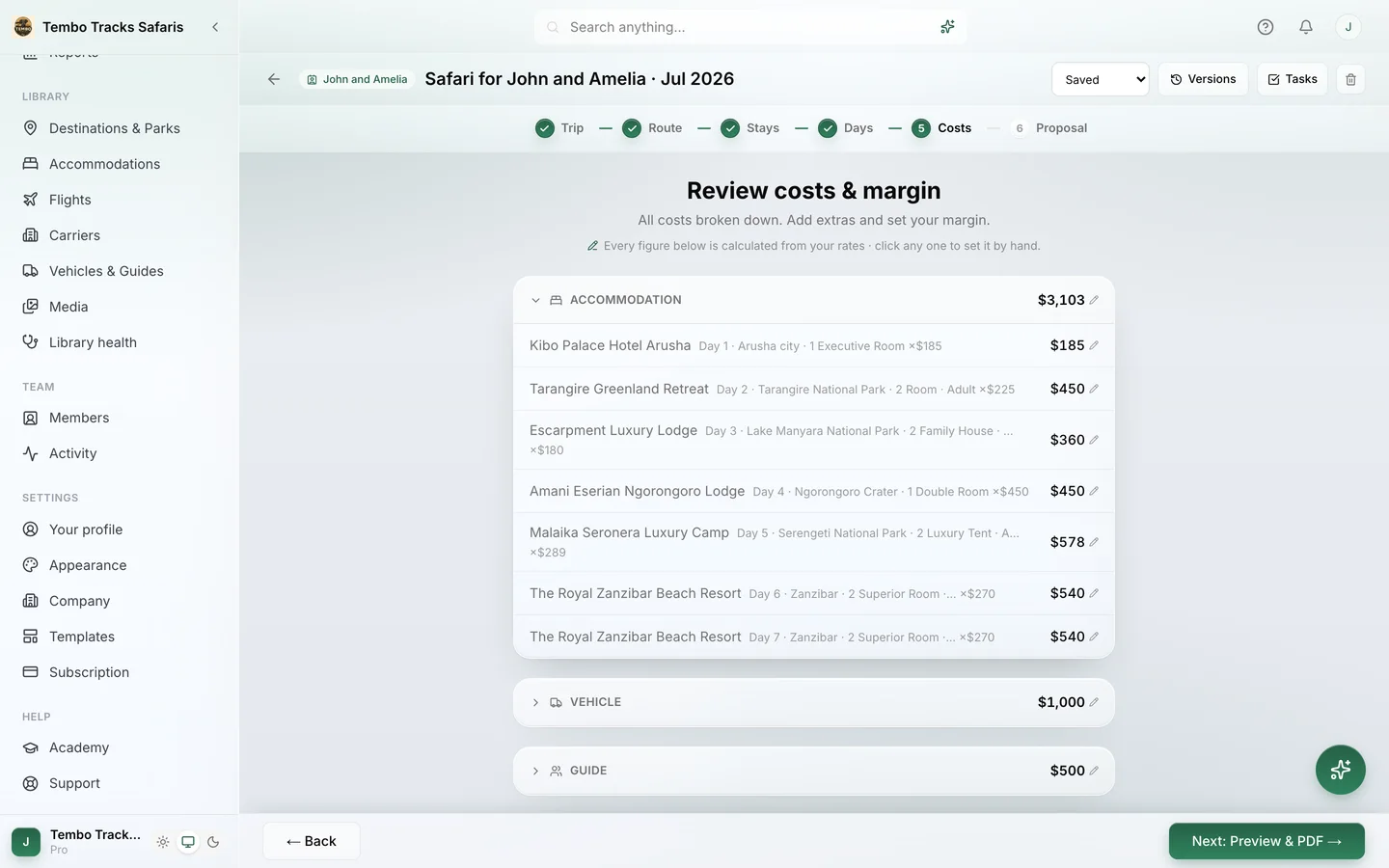
Steps four to six map onto the rest of the Costs step. Vehicles and guides are costed resources with daily rates, and double-booking one across trips raises a conflict warning naming the vehicle or guide, per day. Every line accepts a manual override: Accommodation, Vehicle, Guide, Transfers, Flights, Optional activities, Park fees, Additional costs. Margin sits on top as its own visible layer, which is step six done the deliberate way.
And step seven, the stale-rate check, is the one the software does best, because it never gets tired. When no imported rate covers a travel date, the line shows a rate-gap warning instead of a silently wrong number, and the optional closest-year fallback is always labelled as an estimate.
This page covers the costing job. The neighbouring pages cover the rest: tour pricing software treats the engine as a software category for a desk comparing tools, the safari itinerary builder covers the builder the engine lives inside, and safari tour operator software covers the whole platform, enquiry to invoice. Plans are public, with a 30-day trial of the full Pro feature set and no credit card; current numbers are on the pricing page.
Cost one of your real trips. A demo prices a tour you actually sell, with your parks, your party mix and your rates, line by line. Book a demo
Where AI fits, and where it does not.
The slowest part of adopting any costing tool is getting the rates in, and that is the job Itero AI, the assistant inside Itero Desk, is pointed at. It reads lodge rate sheets in PDF, Word or Excel and turns them into structured seasonal rates that a person reviews and confirms; park fee and flight rate imports work the same way. What it never does is price from imagination. Every number in a quote comes from imported rates and the park fee library, and margin is set by the desk. AI assists, the desk decides.
Who should keep the spreadsheet.
An honest section, because the method above is free and the software is not. A desk that quotes a handful of trips a year, from a short list of suppliers whose rates rarely change, can run the seven steps in a well-kept spreadsheet: date every rate, keep one master file, name one owner, audit it once a season. The failure modes on this page are failures of volume, variation and turnover, and a small stable desk may simply not have them yet.
Two more honest lines. Operators selling outside the safari world entirely, say European city breaks or US domestic travel, would not benefit from the tuned fee mechanics, which are built around parks, camps and safari logistics, and fee automation is a large part of the engine's value. And Itero Desk is software, not a travel agency: it does not sell, book or arrange trips, and it does not process or hold traveller payments; you collect from clients however you already do.
Frequently asked questions.
How do you calculate the cost of a tour?
Price the party and dates first, then accommodation per night per room by season and board basis, then park and entry fees per person and per vehicle by age band and visitor category, then transport as vehicles and guides at daily rates plus transfers and flights, then activities and extras. Add margin as its own line, then confirm every rate matches the travel dates' season and year.
What is the difference between tour cost and tour price?
Cost is what the operator pays suppliers: accommodation, park fees, transport, activities and extras. Price is cost plus margin. Keeping margin as its own visible line, rather than padding hidden inside cost lines, shows what a discount really costs, lets margin vary by agent or season, and keeps the quote defensible when a client or partner questions it.
Which tour costs are most often forgotten?
Three recur: the vehicle's own park entry fee, which some authorities charge separately from the per-person fees; the guide's daily cost on long trips, which keeps running through repositioning and waiting days; and children priced as adults instead of through the correct age band, which misprices both the park fees and the lodge rates on every family booking.
Can I calculate tour costs in a spreadsheet?
Yes, and many desks do. The method on this page runs in any spreadsheet. The risks are structural rather than mathematical: formulas fork as each trip's sheet is copied and edited, rates go stale with nothing to flag them, and the file tends to end up owned by one person. Small stable desks can manage those risks with discipline; growing desks usually cannot.
Is there a free tour cost calculator I can try?
Yes. The safari quote builder on this site is a free interactive calculator: enter a party, dates and parks, and it prices the trip from real rate logic, including seasonal bands and park fee mechanics counted per person and per vehicle. It demonstrates the method; pricing from your own contracted lodge rates happens inside Itero Desk, where your rate sheets live.
How does Itero Desk calculate the cost of a tour?
From the operator's own data: contracted lodge rates by season and board basis, your own park fees computed per person and per vehicle by age band and visitor category through mechanics tuned for fifteen safari countries, vehicles and guides at daily rates, transfers, flights, activities and manual overrides on any line. Margin sits on top as its own visible layer, and the cost panel updates live while the trip is built.
Why do quotes built on last year's rates go wrong?
Because the error is invisible at quoting time. A stale rate produces a confident, precise-looking total, and the gap only appears when the supplier invoices at the current rate, after the price was promised to the client. Itero Desk raises a rate-gap warning when no imported rate covers the travel date, and its optional closest-year pricing is always labelled as an estimate.
Does the AI set the price?
No. Itero AI imports rate sheets, park fees and flight rates into structured data that a person reviews and confirms, and it can draft and translate documents. It never invents a cost: every number in a quote comes from imported rates and the park fee library, and margin is set by the desk. AI assists, the desk decides.
The next quote deserves a cost sheet you can defend. Book a demo and cost one of your real tours in Itero Desk, line by line. Book a demo · Existing customer? Sign in